Run Multiple Events Without Multiplying Your Work
Manage multiple events from one platform without rebuilding everything each time.
Running multiple events shouldn't mean doing everything multiple times
When every event lives in a different system, your team ends up repeating the same setup, fixing the same issues, and managing disconnected data. It slows everything down.

Rebuilding from scratch every time
You've perfected your registration flow, email sequence, and event structure. But when it's time to launch the next event, you're copying fields one by one, recreating forms, and rewriting the same confirmation emails.
Inconsistent event experience across the portfolio
Your attendees notice when each event feels completely different, and your brand suffers from the inconsistency because you’re rebuilding each event from scratch every single time.
Manual content replication
Copy-pasting session descriptions, rebuilding agendas, reformatting speaker bios, and manually updating branding elements across multiple events. Every recurring webinar series or annual conference becomes a full rebuild instead of a quick launch.
Build once, deploy many times
Event Tech Stack treats your event portfolio as a connected system, not isolated projects. Launch new events by building on what already works instead of starting from zero.
AI-Enabled Event Creation
Let AI build the project framework
Start with a generated event structure based on your event type, then refine it to fit your needs.
Smart Customization
Clone entire events and customize what matters
Duplicate events with registration, sessions, and communications already in place, then adjust what’s unique.
Multi-Event Dashboard
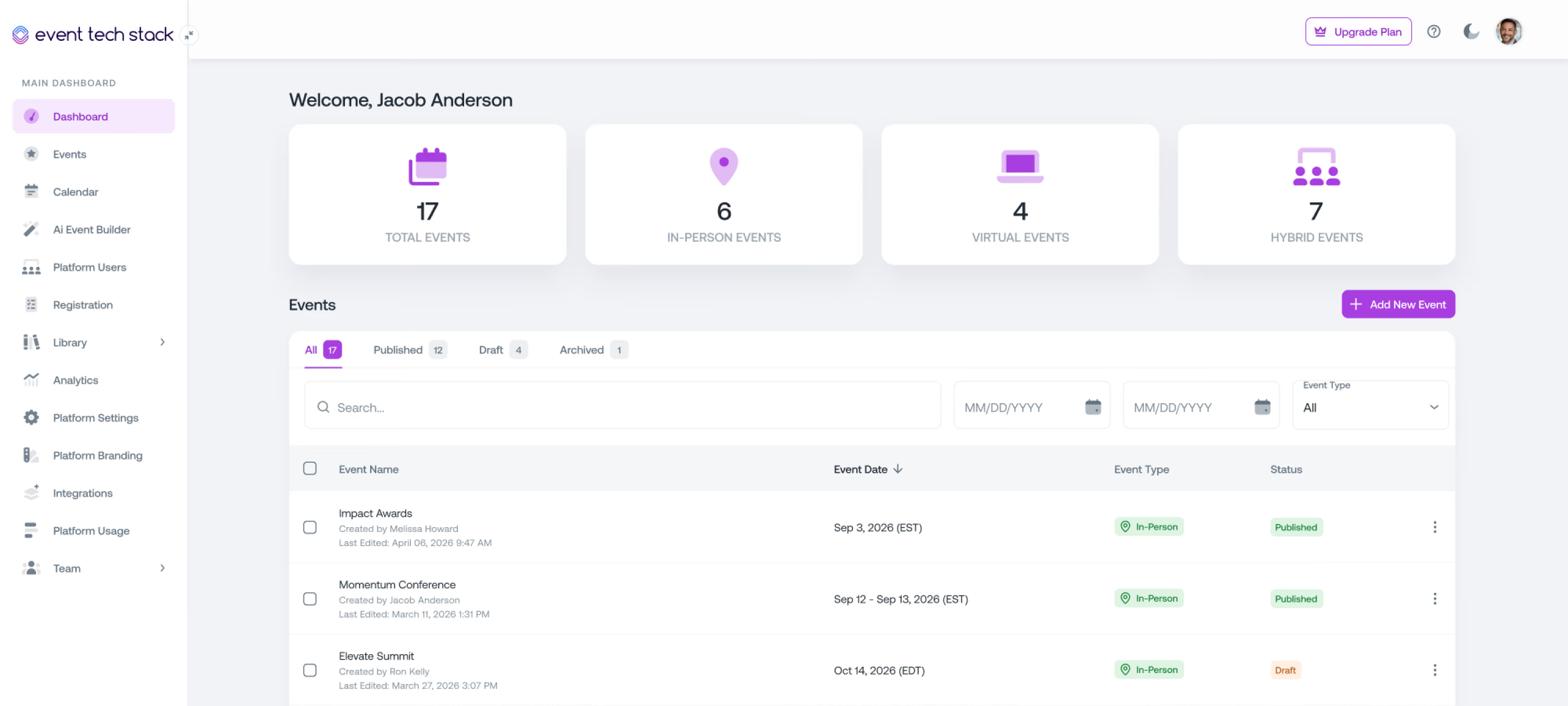
Manage your entire event portfolio from one place
See all of your in-person, hybrid and virtual events in one place and jump into any event when you need to make updates.
Team Collaboration Across Events
Give your team access to the right events
Control who can view or manage events without exposing unnecessary access across the platform.
Templates that actually save time
Standardize how your events are built so your team can move faster without sacrificing quality.

Event Templates
Save full event setups including registration, microsites, sessions, communications, and surveys, then reuse them across events.

Email & SMS Templates
Build email and SMS templates for confirmations, reminders, waitlist notifications, and follow-ups. Keep messaging consistent across events while updating details for each one.

Agendas & Sessions
Reuse agendas and sessions by cloning events or using templates, with structure, timing, and speakers carried over.

Landing Page & Microsite Templates
Create consistent event experiences with reusable layouts and update event-specific content as needed.

Badge Design Templates
Create badges within your event and reuse them when events are cloned or templated.
Deliver recognizable quality every time
Your events should feel consistent, even when they’re built quickly.

Brand Consistency
Keep your branding consistent across every event. Colors, layouts, and visual details stay aligned so each event feels like it comes from the same organization.

Operational Consistency
Standardize how your events run. Registration flows, confirmation steps, and attendee communications stay consistent while still adapting to each event.

Data Consistency
Keep registration fields consistent across events so your data stays clean and easy to compare.

Content Consistency
Keep session descriptions, speaker bios, and attendee messaging aligned with your voice. Use a consistent structure while customizing content where it matters.
Give your team the access they need without the chaos
Assign permissions by role so each team member can manage their events without unnecessary access.
Generate event content in minutes with AI
Let AI handle repetitive tasks while you focus on what makes each event unique.

AI Event Builder
Generate a full event setup from a simple brief, including structure, registration, and core content.

AI Agenda Builder
Brainstorm session ideas and generate a structured agenda in minutes based on your event type.

AI Communications
Create emails and messaging based on your event details, then refine and send.
See your entire event portfolio at a glance
View all in-person, hybrid, and virtual events in one place with key metrics and quick access to each event.

Event Status Overview
See which events are draft, published, or archived so you always know where each event stands.

Key Metrics Across All Events
See registrations, attendance, and engagement across all events in one place so you can understand performance at a glance.

Event-Specific Drill-Down
Move from a portfolio view into detailed event analytics with direct access to each event.
Why teams switch to Event Tech Stack
Built by event professionals for the reality of live events, where updates need to happen instantly, and your technology can't be the thing that breaks.
01
True Unified System
Data flows instantly across every part of your event without manual syncing or integration delays. Changes happen once and update everywhere in real time.
02
Built by Event Professionals
Built by people who've run events under real pressure and know that last-minute changes and live coordination aren't edge cases, they're how events work.
03
Flexible & Scalable
Scale your events without hitting artificial limits, feature restrictions, or pricing penalties. What works for your first event still works when you're running hundreds.
04
Quick Setup
Launch new events quickly by building on proven systems while maintaining full control over configuration and customization.
The platform event professionals lean on when it matters the most
From Fortune 500 companies and production agencies to small businesses, event professionals choose Event Tech Stack when seeking a reliable, flexible solution.
Executing events across a multi-day program in Cannes gets complicated. Each event or experience requires custom reg flows to manage unique audiences, schedules, and execution. Bringing all of our registration onto a single platform with ETS made all the difference. Our partners and guests were able to register once, using a single credential to access multiple events. Our team had access to comprehensive tracking and analytics across the entire program.
View Case StudyBrian
Global Tech Director, B2B Marketing
I wanted to say a massive thank you & well done for all your efforts. You made it all happen & work seamlessly and everyone is so appreciative of the success you pulled off – we’re all super impressed & grateful!
Jamie C.
Head of Production

We found ourselves in a very challenging position – and you and your intrepid team came through like no other. Beyond impressive. Closer to miraculous.Know you have made a LOT of friends at EY.
Lisa S.
Director, Brand, Marketing & Communications, Americas
Thank you for all you have done to make every Light The Night event spectacular this season. From building the platform – to customizing the platform across the 78 market sites – to executing the event nights with us. HUGE THANKS!
Jana B.
VP Campaign Development, Community Initiatives

Everyone was incredibly pleased with the Service Heroes Virtual Event and we’ve been flooded with amazing feedback from executives! We wanted to extend our sincerest thank you to the ETS Team.
Amanda S.
Senior Producer

Attendees were loving every bit of the platform and content! Through your tireless efforts between pre-production and during the show, this was certainly a success and we’re grateful for your partnership along the way.
Jon S.
Senior Producer
For the first time ever, we were able to see all participants across all Cannes events, from delegate sessions to the cocktail hours to the main party, all in one place. The ETS platform enabled a comprehensive view with 12K participants so we could see everyone who was invited, registered, and attended. In addition to just knowing who was there, this data enables a better calculation for ROI purposes.
View Case StudyBarton
Director, Global Marketing Ops & Analytics


One platform to power every part of your event
Explore how Event Tech Stack unifies your entire event ecosystem in one scalable platform.
Event Registration
Flexible event registration structures with access controls, approval workflows, and session-level permissions.

Event Marketing & Communications
Send event emails and SMS communications directly from the platform with built-in tracking and segmentation.

Event Websites
Launch fully branded event websites with integrated registration and dynamic content management.
Capacity & Waitlist Management
Control event and session attendance with configurable capacity limits and automated waitlists.

Livestream & VOD
Stream live sessions and deliver on-demand content using built-in video infrastructure.

Onsite Check-in & Badging
Manage high-volume attendee check-in with QR scanning, kiosks, and on-demand badge printing.

Attendee Event Hub
Provide attendees with one destination for accessing events, sessions, and content across web and mobile.

Analytics & Reporting
Monitor registration, attendance, engagement, and livestream performance in real time.
AI Event Builder
Generate event structures, pages, and communications using AI-assisted setup workflows.

Mobile App with Real-Time Sync
A mobile app that syncs instantly with the event platform so attendees always see the latest schedule, sessions, and updates.

Multi-Event Management
Manage multiple events from one platform with shared settings, branding, and data. Reuse templates, track performance across events, and scale without rebuilding from scratch.

Networking & Engagement
Let attendees connect, chat, and engage with speakers, sponsors, and other attendees to grow their network and build connections.

Speaker Management
Give speakers their own space to submit content and updates, keeping your agenda, sessions, and event pages current without manual edits.

Meetings Management
Let attendees, sponsors, and exhibitors book meetings during your event, with real-time availability and confirmations built into the platform.

Continuing Education
Run accredited programs with attendance tracking, completion requirements, and automated certificates tied directly to each attendee's record.
Frequently Asked Questions
Quick answers about managing multiple events efficiently with Event Tech Stack.
Can I really clone an entire event, or is it limited?

Yes, you can clone complete events, including all registration levels, custom fields, access rules, email templates, landing pages, session structures, and badge designs.
What if each event needs to be totally different?
Templates provide starting points, not limitations. You can clone an event for the structure, then customize every element to match your specific needs. You maintain full control over what stays consistent and what changes.
Can different events have different registration forms?
Absolutely. Each event maintains its own registration structure. You can use templates as starting points or build completely custom forms for events with unique requirements.
How do I manage team access across multiple events?
Assign role-based permissions that determine which events team members can access and what actions they can perform.
Can I have different branding for different events in my portfolio?
Yes, each event can have unique branding, including colors, logos, fonts, and styling.
Can I automate email sequences across all my events?
Yes, you can create email templates for confirmations, reminders, and follow-ups that automatically populate event-specific details.
See How Event Tech Stack Powers Your Events — In Just 30 Minutes
Book a live demo to see how Event Tech Stack supports your specific event format.